AV / COLLECTION 001
Your archive.Always in earshot.
Search samples, records and MIDI by sound, key, tempo and mood. Build playable kits, shape DJ sets and keep every file on your Mac.
14-day free trial / no card / one-time purchase
- LIBRARIES
- Samples / Tracks / MIDI
- STORAGE
- Local to your Mac
- LICENSE
- Pay once / future updates
 AudioVaultLOCAL ARCHIVE
Inside the product
Hear Your Library in New Dimensions
Browse, analyze, visualize, and transform audio collections from one searchable workspace.
From a crowded vault to the right sound
Use the controls yourself, or watch one silent pass through a fictional sample library.
- 1Browse
- 2Narrow
- 3Audition
- 4Find similar
Fictional names and generated interface only. No audio is loaded or played.
Your Best Sounds Shouldn't Be Buried
Sample packs, old projects, promo downloads and MIDI folders pile up fast. Finding the sound you remember should not break the idea.
Meaningless Filenames
Filenames like bounce_03_final.wav tell you nothing about key, tempo or vibe. You lose time auditioning the same folders again and again.
Sounds That Don't Fit
A loop that clashes with your track kills momentum, and a record that clashes with the one before it kills a set. Checking every file by ear pulls you out of the session.
Clutter Everywhere
The same kick lives in five packs under five names, the same record sits on disk twice, and supposedly lossless files are not always what they claim to be.
Samples, Tracks and MIDI in One Place
Switch between the sounds you produce with, the tracks you DJ with and the MIDI ideas you build from without changing apps.
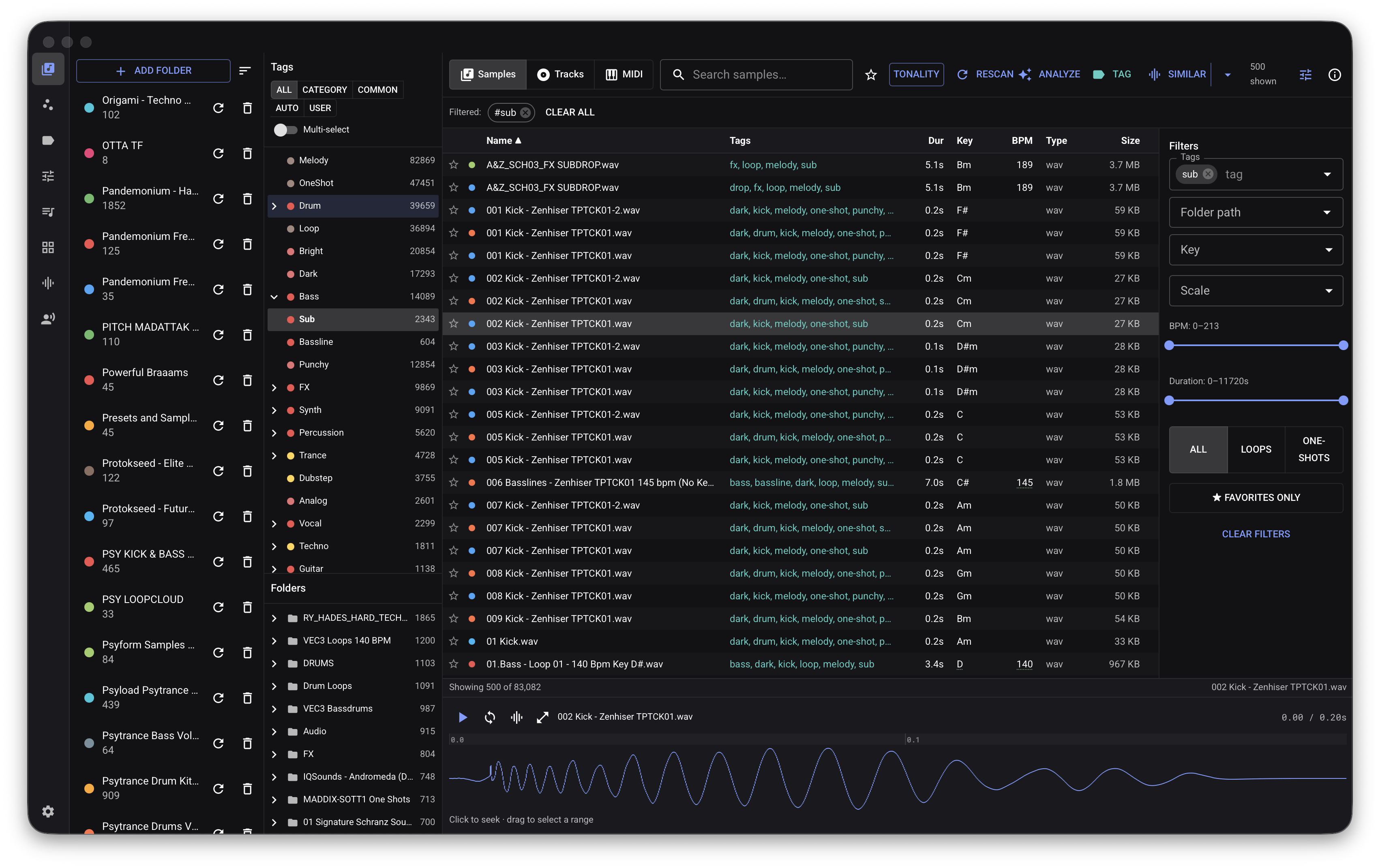
One-shots & loops
Bring scattered sample folders together and browse even a huge collection without slowing down your session.
- WAV, AIFF, FLAC, OGG and MP3; M4A/AAC in the direct edition
- See key, BPM, character, one-shots and loops at a glance
- Finds common Splice, Loopcloud, Ableton, Logic, NI and MPC folders
- Preview, trim and drag sounds directly into your DAW
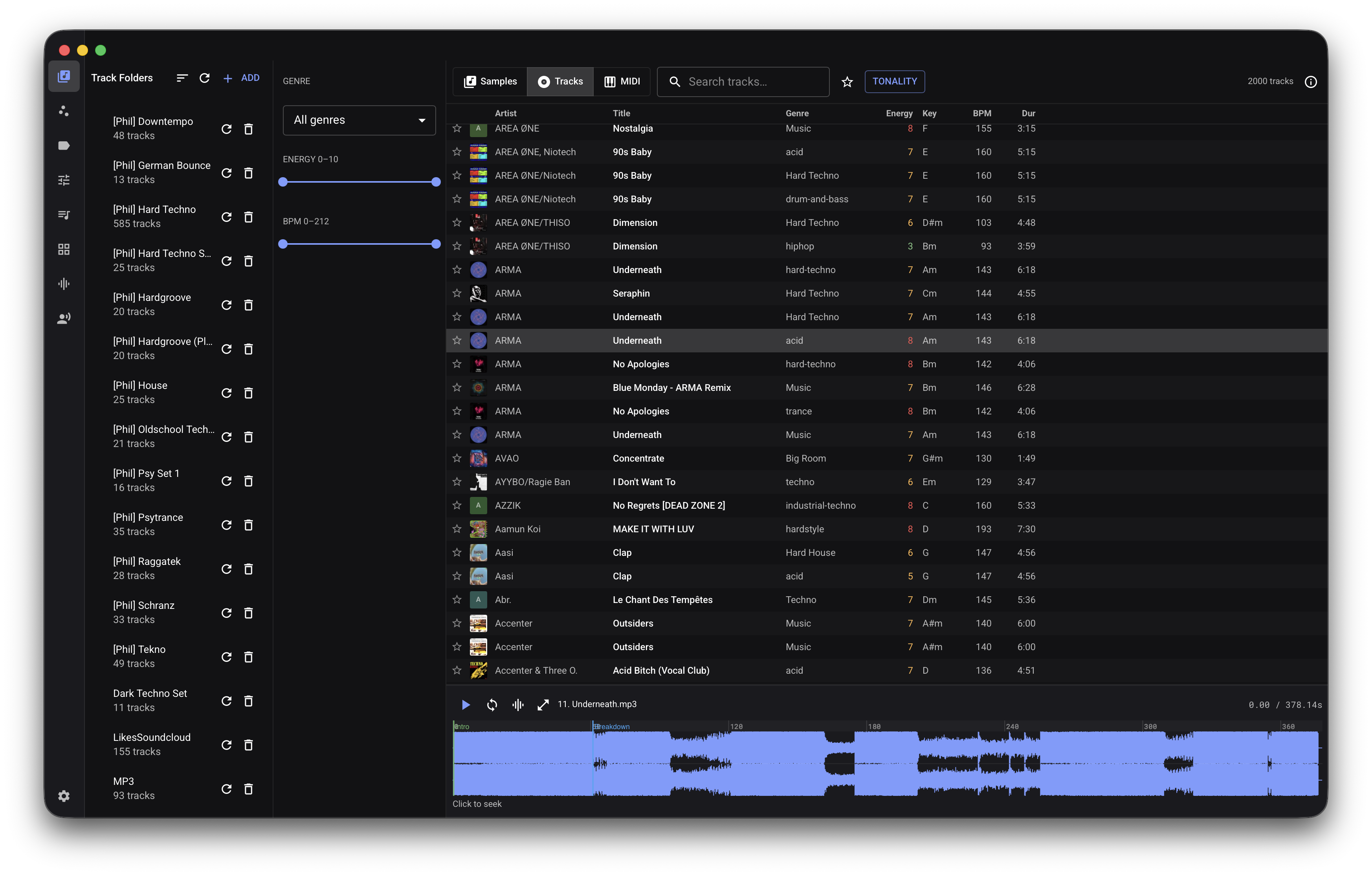
Full records, for DJs
Keep finished music separate from production samples, with the information you need to prepare a set.
- Key, BPM and a simple 1–10 energy score
- Editable intro, drop, breakdown and outro markers
- Previews jump to the part you actually want to hear
- Artwork, notes and duplicate-song checks
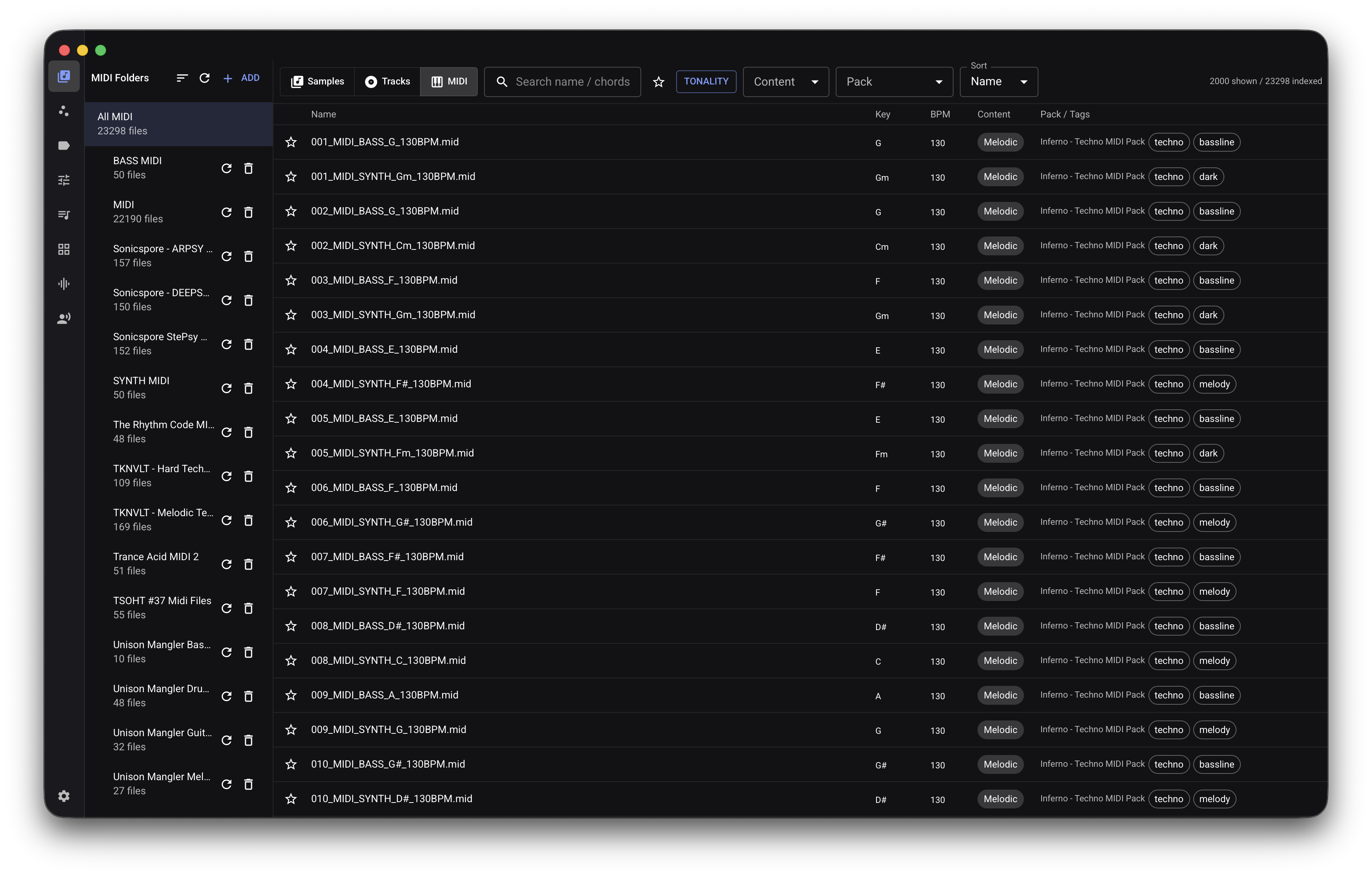
Patterns & progressions
Hear, search and organize the patterns and progressions hidden across your .mid packs.
- Automatic key and musical-role detection
- Separate drums, melodies, chords and mixed patterns
- See chord progressions before opening your DAW
- Click to play through a built-in synth with a piano roll
Explore your collection visually, filter it your way, and hear any result before you commit it to a project or set.
Useful Details, Filled In Automatically
AudioVault listens to each file on your Mac and adds the musical details that filenames leave out.
Key & Scale
Quickly narrow your search to sounds and tracks that belong in the same harmonic world.
Tempo & Energy
Match loops to the project tempo and arrange DJ sets with a natural rise and fall in intensity.
Sound Character
Filter by qualities such as bright, dark, sharp or smooth, and separate one-shots from loops automatically.
Sounds-Like Search
Pick a sound you like and reveal close alternatives from your own collection, with control over tone, rhythm and pitch.
See Whether That FLAC Is Really Lossless
Check suspicious downloads at a glance and catch files that were converted from a lower-quality source.
- See the whole file. The spectrogram makes missing high frequencies and compression cutoffs visible.
- Get a quick quality hint. AudioVault estimates the likely source quality and highlights suspicious files.
- Avoid false alarms. Naturally dark recordings are not treated as low quality just because they lack top end.
- Trust the useful warnings. The fake-lossless label is reserved for clear evidence, not guesswork.
Categorized in Plain Language
Let AudioVault turn vague filenames into useful categories such as instrument, genre, mood and character.
- Use the AI you prefer. Connect Anthropic, OpenAI, Gemini or an existing Claude subscription.
- Your audio is never sent. Only filenames and detected details are shared when you enable an AI provider.
- Tags made for music. Browse by instrument, genre, mood, playing style, effects and more.
- Useful without AI. AudioVault still organizes files locally when no provider is connected.
- Just ask. Type “select all dark 808s” and get a real selection you can hear and adjust.
Find the Sound You Hear in Your Head
Search with words, start from a reference sound, or filter by the musical details that matter in your session.
Sounds-Like Search
Pick anything and instantly hear the closest alternatives in your samples or tracks.
Query by File
Drag in an external file — even one that isn't in your vault — and surface the closest matches you already own without adding it to your library.
Match Track
Drop in a reference track and find samples that fit its key, tempo and role, ready to layer.
Explore Views
Move through visual maps of your samples, tracks and MIDI to find useful corners of the collection you forgot about.
Deep Filtering
Key and scale, BPM range, brightness, duration, energy, loop vs one-shot, favorites, tags, path segments and full-text search — combined, across any of the three libraries.
Duplicates & Same-Song
Find identical samples, reclaim disk space and prevent the same song appearing twice in a DJ set.
From Vault to Session in One Click
Turn a selection, a reference or a sentence into something you can play, edit and export.
DAW Kits That Are Actually Playable
Build Ableton Drum Racks and Live Sets or Maschine groups and projects from the sounds already on your Mac.
Build Inside A Running Live Set
Connect to Ableton Live and work in it: place samples and MIDI on the timeline, create tracks and buses, adjust plugins, edit notes and write automation — from AudioVault or an AI assistant.
One Kick, Not Ten
Get a balanced starting kit with kicks, snares, hats and useful variations instead of a pad grid full of near-duplicates.
Named, Editable, Re-exportable
Save favorite kits, edit every pad and export them again whenever a project needs them.
Magic Sort & Set Generation
Shape playlists into chapters, order them by key, BPM and energy, get next-track ideas and export an organized USB folder.
Nine Genres, Or Just Ask
Start with genre-ready patterns, add swing and variation, then export MIDI or an Ableton set already loaded with your sounds.
Generate What You Don't Have
Optionally create voice takes and sound effects with your own ElevenLabs account and API key. Provider credits, quotas and usage charges are separate. Provider responses are MP3 128 kbps on every plan, MP3 192 kbps on Creator+, and 24-bit/44.1 kHz PCM on Pro+. AudioVault saves generated clips as WAV.
Ask for a Kit or Set, Then Make It Yours
Describe the direction you want. AudioVault searches your own library, shows its choices and leaves every decision editable.
- Uses sounds you actually own. Suggestions come from your indexed files, not an imaginary catalog.
- Starts with a complete draft. Empty kit pads are filled sensibly and set ideas arrive with a usable order.
- You stay in control. Review chapters, track order and pad choices before saving or exporting anything.
- No accidental repeats. Duplicate copies of the same song are kept out of generated sets.
Private on Your Mac
Your library and audio analysis stay on your computer. The desktop app has no usage tracking, and online integrations are optional.
One simple Mac app
Install AudioVault and start adding folders. There is no account to create and no companion service to manage.
No desktop-app tracking
The AudioVault desktop app does not report how you use it. Your library database stays on your Mac.
Your own AI account
Connect an AI provider only if you want to. Your account and its privacy terms remain between you and that provider.
Download the AudioVault Whitepaper
See how AudioVault helps producers organize, search and use large sample, track and MIDI libraries.
Find Your Next Sound Today
Try it free for 14 days. Buy once for €65, own it forever, all future updates included.