Solution Whitepaper | Amsterdam Technologies
AudioVault: Local Sample Library Manager with AI Tagging, Tonality Detection, and Similarity Search
Furthermore, existing solutions suffer from structural inaccuracies in audio analysis. Standard BPM detection algorithms routinely fail on syncopated material…
The Problem
Modern audio professionals, producers, and DJs manage immense libraries of sample packs, full tracks, and MIDI files. As these collections grow into the hundreds of thousands of files, organizing and recalling the right sound becomes a severe operational bottleneck. The structural gap in the market lies in the friction of asset retrieval: traditional file systems rely on rigid, often meaningless filenames (e.g., "bounce_03_final.wav"), while incumbent library managers force users into proprietary cloud ecosystems that introduce latency, require constant network connectivity, and demand recurring subscription fees.
Furthermore, existing solutions suffer from structural inaccuracies in audio analysis. Standard BPM detection algorithms routinely fail on syncopated material or report half-time/double-time errors due to integer-lag quantization constraints. Key detection systems often discard sub-bass fundamentals, leading to incorrect harmonic matching for electronic and bass-heavy music. When producers are forced to manually audition dozens of poorly labeled kicks or meticulously verify the true bit-rate of a downloaded file to avoid "fake lossless" artifacts, the creative workflow halts. A new approach is required—one that combines edge-based machine learning, high-precision digital signal processing (DSP), and strict local privacy into a seamless desktop experience.
Solution Overview
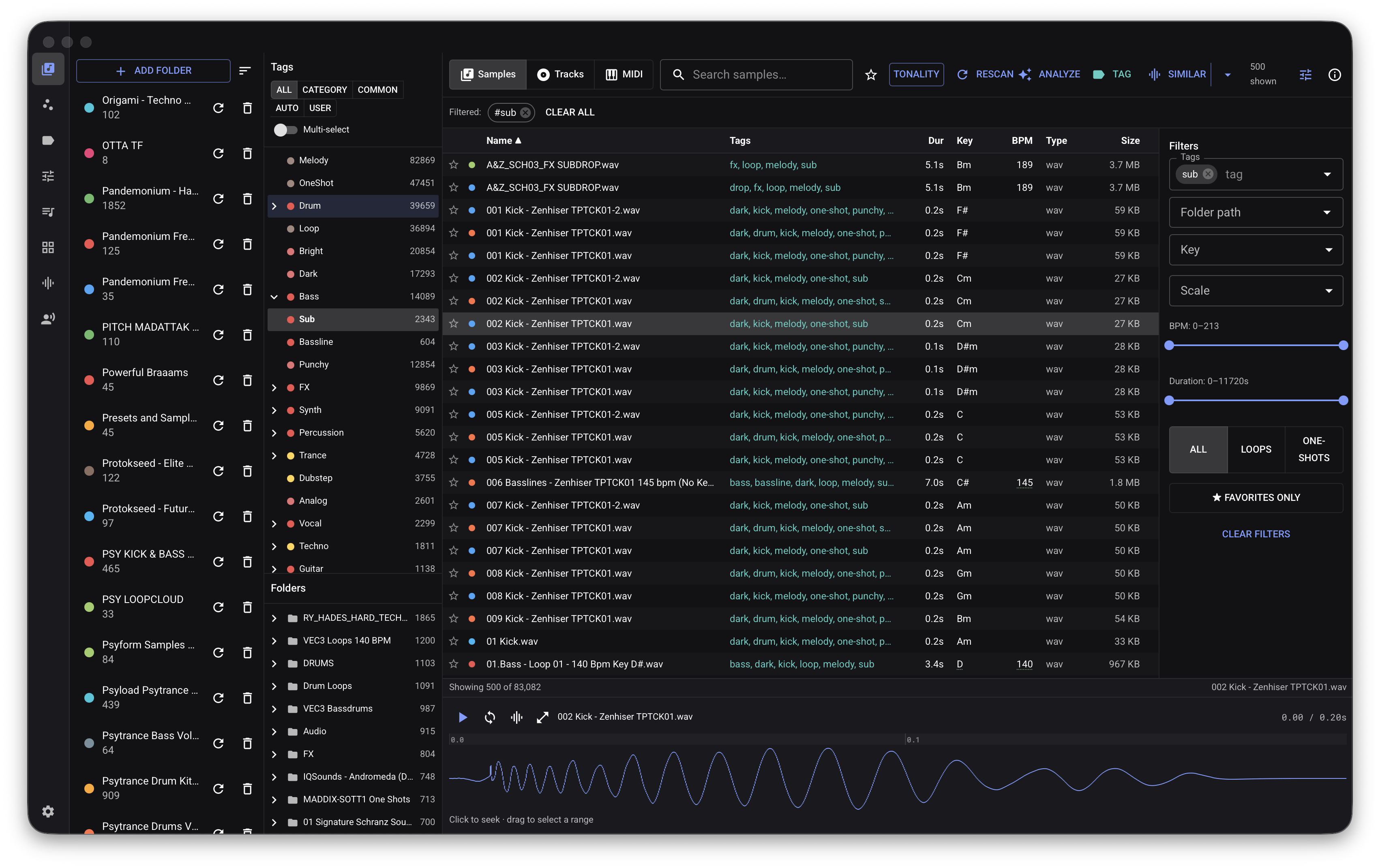
AudioVault is a production-grade, local-first desktop application designed to solve the audio asset retrieval problem. Built as a self-contained executable for macOS, Windows, and Linux, it unifies sample, track, and MIDI management under a highly optimized local architecture.
The core architectural thesis of AudioVault is that high-performance audio analysis and machine learning should run on the edge, without cloud latency or forced telemetry. By utilizing a pure-Go DSP engine and a localized SQLite index, AudioVault executes complex tonality detection, onset envelope analysis, and similarity search directly on the user's hardware. It pairs this deterministic processing with bring-your-own-key AI tagging, allowing users to leverage advanced Large Language Models (LLMs) to categorize their libraries in plain language without uploading a single audio file. This design ensures absolute data privacy, sub-millisecond retrieval times, and the ability to instantly generate DAW-ready kits and DJ sets directly from local storage.
Key Capabilities
Pure-Go Digital Signal Processing (DSP)
AudioVault replaces fragile external dependencies with a bespoke, pure-Go DSP engine that analyzes tonality, tempo, and timbre at native execution speeds.
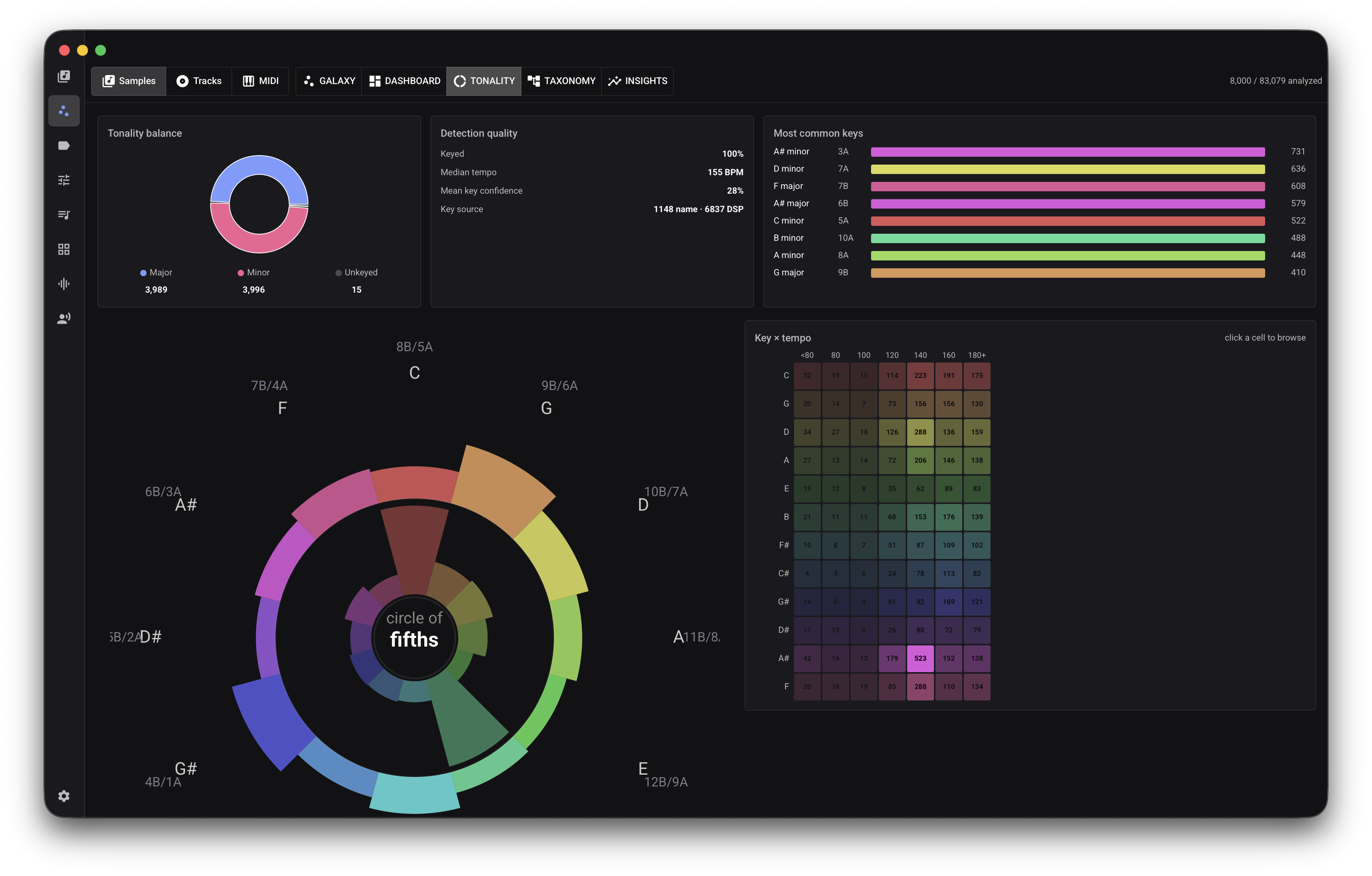
- Tonality Detection: Utilizes a Harmonic Pitch-Class Profile (HPCP) front-end integrated with Krumhansl-Schmuckler key profiles. It applies harmonic folding, bass-fundamental emphasis, and a tonalness gate to accurately detect the pitch class, scale, and exact key, effectively resolving sub-bass and chordal ambiguities.
- BPM and Metrical Analysis: Employs a log-compressed spectral flux onset envelope and grid-constrained tempo selection. By applying a log-normal tempo prior and sub-lag precision interpolation, the system mitigates standard half-time/double-time aliasing, providing highly accurate tempo locks even on syncopated bar-cut loops.
- Timbre Extraction: Calculates spectral centroid, rolloff, flatness, bandwidth, and Mel-Frequency Cepstral Coefficients (MFCCs) to algorithmically categorize a sound's physical characteristics, instantly separating percussive one-shots from melodic loops.
Similarity Search and Perceptual Embeddings
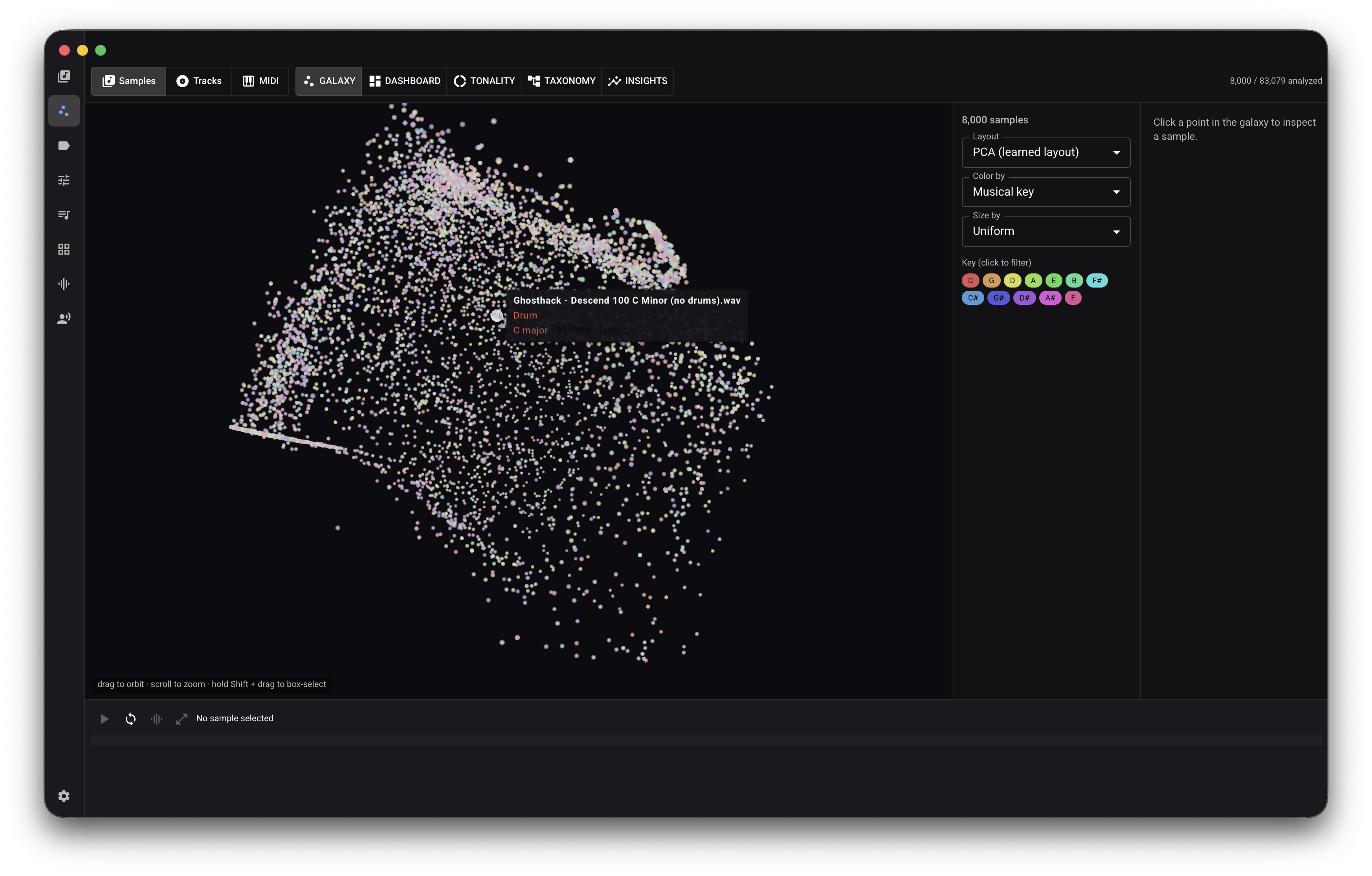
Finding alternatives to a specific sound is a mathematical challenge. AudioVault generates 48-dimensional perceptual embedding vectors for every file during the scan phase, mapping timbre, rhythm, and pitch groups into a spatial index.
- Sounds-Like Search: Users can execute weighted nearest-neighbor searches across the embedding space to find sounds with identical profiles, adjustable across rhythmic or timbral axes.
- Query by File & Match Track: The system allows users to drag an unindexed reference track into the application. AudioVault extracts its features on the fly and queries the existing library for compatible keys, BPM windows, and timbral complements, facilitating rapid layering without polluting the core database.
AI Tagging and Agentic Generation
AudioVault bridges the gap between raw audio features and human intent using a provider-agnostic LLM tool loop.
- Secure Tagging: Users connect standard AI providers (Anthropic, OpenAI, Gemini) or utilize a local CLI subscription. The system translates filename heuristics and extracted DSP features into a structured Universal Category System (UCS) taxonomy. Audio is never transmitted; only metadata is processed.
- Natural-Language Selection: Users can search using conversational prompts (e.g., "select all dark 808s"). The ReAct-based agentic tool loop converts this intent into precise database queries.
- DAW Kit and Set Generation: The agent acts autonomously to curate balanced, playable kits (e.g., ensuring a drum rack contains one kick, one snare, and varied hats rather than ten identical kicks) and exports them via direct XML template injection into Ableton Live (.adg/.als) and Native Instruments Maschine (.mxgrp/.mxprj) formats.
Audio Quality Verification (Spectrogram)
To combat the proliferation of up-sampled, "fake lossless" audio files, AudioVault includes a highly optimized, native-sample-rate spectrogram.
- Visual Validation: Renders a time-frequency dBFS heat map calculated over the long-term average spectrum. Sharp horizontal cutoffs reliably expose lossy encoding boundaries (e.g., a 16 kHz cutoff denoting a ~128 kbps source) packaged in FLAC or WAV containers.
- Algorithmic Guardrails: The estimation engine differentiates between a genuine high-frequency drop-off in dark recordings and the artificial razor-edge shelf of a lossy encoder, preventing false positives.
Architecture & Technical Design
AudioVault is engineered as a single-binary desktop application, eliminating the overhead of containerization, background daemons, or mandatory cloud connectivity.
The application utilizes a Wails v3 shell, binding a Go 1.26 backend to a React 19 and Three.js frontend. All data is persisted in a local SQLite database utilizing Write-Ahead Logging (WAL) with segregated reader and writer connection pools. This ensures the user interface remains completely fluid while parallelized worker pools continuously scan, hash, and analyze thousands of audio files in the background.
Audio decoding (WAV, AIFF, FLAC, OGG, MP3) is implemented entirely in Go, avoiding fragile CGo bindings and ensuring stable cross-platform compilation. Change detection is managed via high-speed xxhash content hashing rather than unreliable file modification timestamps.
For AI integration, AudioVault employs a prompt-driven ReAct (Reasoning and Acting) architecture. The internal agent interacts with the local database via restricted tools, ensuring that LLMs can curate kits and DJ sets without executing arbitrary code. Strict JSON parsing and duplicate-call correction routines act as guardrails against model hallucination, ensuring that a generated Ableton Drum Rack relies solely on valid, local sample identifiers. Privacy is absolute: network egress only occurs if the user explicitly configures an AI API key or a YouTube Data integration for album artwork retrieval.
Use Cases & Scenarios
Electronic Music Producer: Constructing Custom Drum Racks
Challenge: A producer needs to build a custom Ableton Drum Rack from a library of 150,000 samples, but standard searches yield hundreds of identical-sounding kicks scattered across poorly labeled folders. Solution: The producer queries the library for "punchy sub-bass kicks" and utilizes AudioVault's sounds-like search to find complementary snares and hi-hats based on perceptual embeddings. Using the DAW kit generation feature, AudioVault curates a balanced 16-pad layout based on acoustic roles. Outcome: The system injects the selected files directly into an Ableton Live Set (.als) via XML patching. The producer drags the rack directly into the DAW, bypassing manual auditioning and pad mapping entirely.
Touring DJ: Harmonically Curated Sets
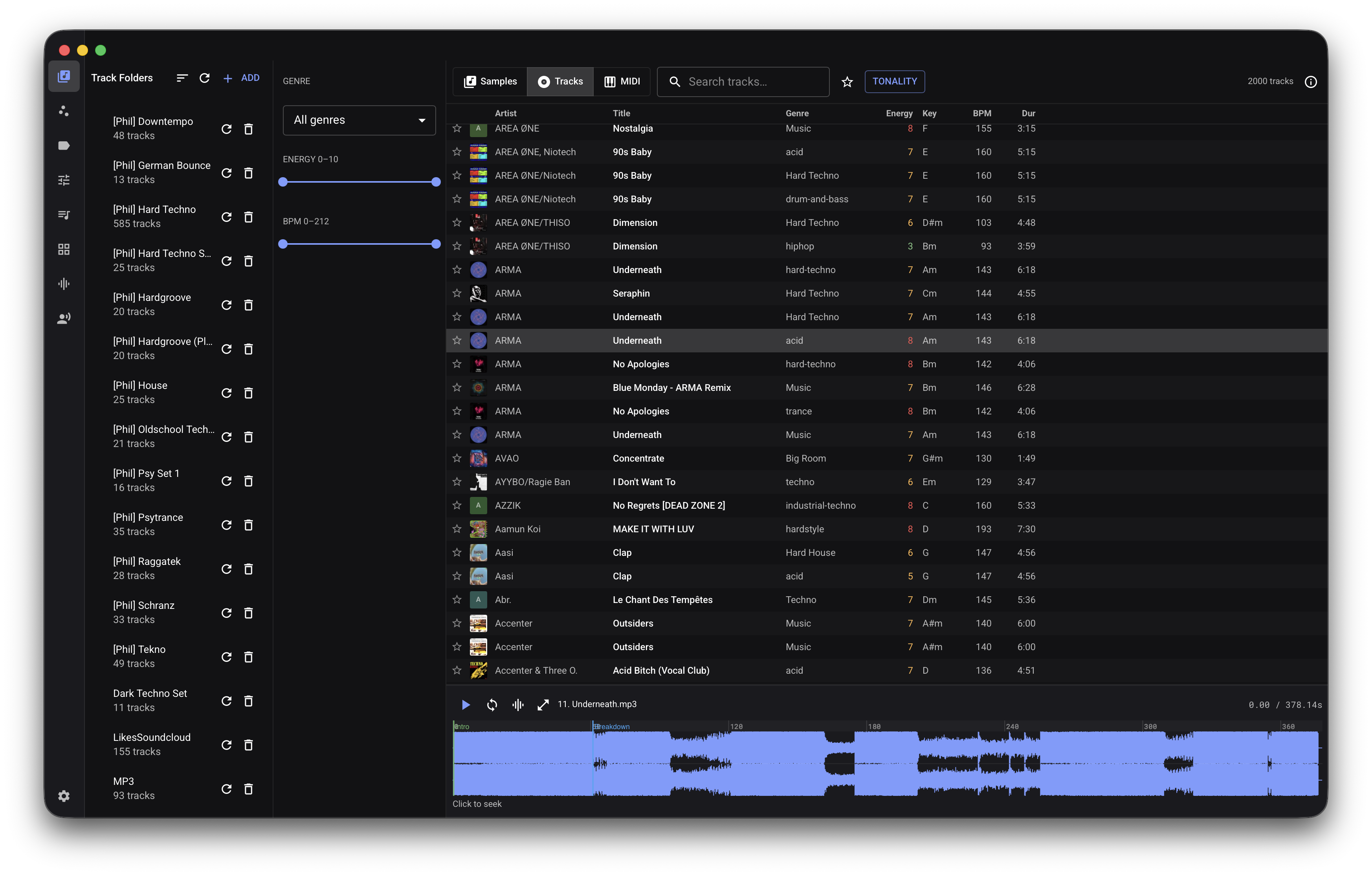
Challenge: A DJ needs to build a 90-minute set from a disparate collection of downloaded FLACs and MP3s, ensuring harmonic compatibility and a logical energy arc, while avoiding duplicate tracks. Solution: The DJ utilizes AudioVault's track index, which automatically identifies exact pitch classes and exact tempos. The DJ employs the Magic Sort feature, which executes a greedy harmonic and BPM chaining algorithm to arrange the tracks. The duplicates engine utilizes content hashing to suppress redundant files. Outcome: A gapless, harmonically consistent playlist is generated, divided into distinct chapters (warm-up, peak, cool-down), and exported securely to a USB drive.
Sound Designer: Auditing Library Quality
Challenge: A sound designer purchases a "lossless" effects library, but suspects the files are up-sampled MP3s, which will introduce artifacts during extreme pitch-shifting. Solution: The designer opens the library in AudioVault and activates the Spectrogram view. The software scans the files at their native sample rates. Outcome: The long-term average spectrum reveals a sharp 16 kHz cutoff across the files. AudioVault flags the tracks as "~128 kbps source," providing cryptographic and visual proof of up-sampling, allowing the designer to discard the compromised assets before utilizing them in a project.
Session Musician: Mining MIDI Progressions
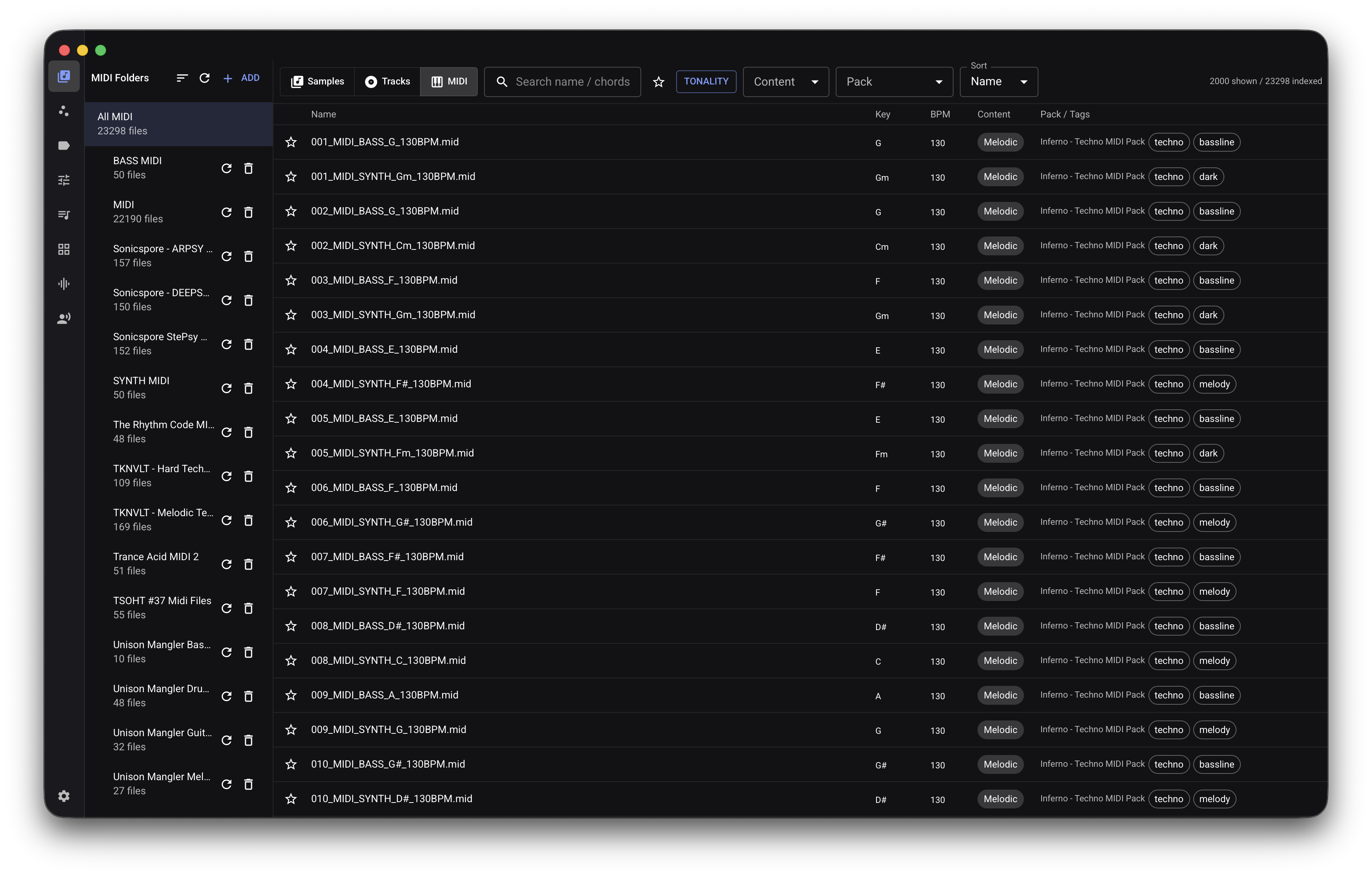
Challenge: A keyboardist has thousands of unorganized .mid files and needs to find a specific minor-key chord progression to fit an existing project. Solution: The musician switches to AudioVault’s MIDI mode. The engine has automatically parsed the SMF files, calculating polyphony, chord progression summaries, and similarity embeddings. Outcome: The musician filters by "minor chords," clicks to preview the progressions through the integrated polyphonic synth, and drags the ideal MIDI file straight into Pro Tools.
Pricing & Plans
AudioVault is distributed as a downloadable desktop application. Standard usage is secured via a lifetime license, ensuring the product never stops functioning due to a lapsed subscription.
| Plan | Price | Included Features |
|---|---|---|
| AudioVault Lifetime | €59 (One-time) | Full application access, unlimited local sample/track/MIDI indexing, pure-Go DSP analysis, AI tagging via local CLI/API, Ableton/Maschine export, Spectrogram, all future updates. |
| Enterprise | Custom | Unlimited usage, deployment support, volume licensing, dedicated account manager, prioritized feature requests, and centralized deployment options for studio environments. |
Pricing Philosophy: Audio tools should be assets, not liabilities. AudioVault is designed as a standalone application that leverages local hardware. By decoupling the software from a cloud subscription model, organizations and professionals pay once for a tool that scales infinitely with their local storage.
Frequently Asked Questions
Is an internet connection required to analyze audio? No. AudioVault's digital signal processing—including tonality, BPM, spectral analysis, and similarity embeddings—is executed entirely on local hardware using an in-process Go engine. Network connections are only utilized if you choose to enable third-party AI API keys for tagging or online metadata retrieval for track artwork.
Does AudioVault modify my original audio files? No. AudioVault operates purely as a non-destructive index. It reads your audio files, calculates hashes and features, and stores the metadata in a local SQLite database under your operating system's application-support directory. Your source files are never altered or moved.
How does AI tagging work if my audio never leaves the machine? The AI tagging engine operates on metadata. AudioVault extracts acoustic features (e.g., brightness, transient density, duration) and filename heuristics locally, sending only a highly structured text prompt to your configured LLM provider. The LLM returns a structured taxonomy response. No raw audio data is ever transmitted.
What DAW formats does the kit generator support?
AudioVault supports native template injection for Ableton Live (Drum Rack .adg and Live Set .als) and Native Instruments Maschine (Group .mxgrp and Project .mxprj). Kits are correctly formatted with relative gain normalization and proper sample length boundaries.
What operating systems are supported? AudioVault is fully supported on macOS 12 and later, with native functionality including full drag-out integration into DAWs and Finder. Windows and Linux builds are also maintained for cross-platform workflows.
Why Amsterdam Technologies
Amsterdam Technologies engineers tools for professionals who cannot afford friction. Headquartered in Amsterdam, our engineering-first culture prioritizes performance, data sovereignty, and deterministic outcomes over fleeting trends. AudioVault represents a commitment to local-first architecture—proving that edge-based DSP and optimized SQLite can outperform heavily capitalized cloud platforms. As we expand the AudioVault roadmap to include advanced tempogram analysis and harmonic-percussive separation, we remain dedicated to building software that respects the user's hardware, privacy, and time.
- Website: https://audiovault.amsterdam-technologies.com
- Contact: support@amsterdam-technologies.com
- Company: amsterdam-technologies.com
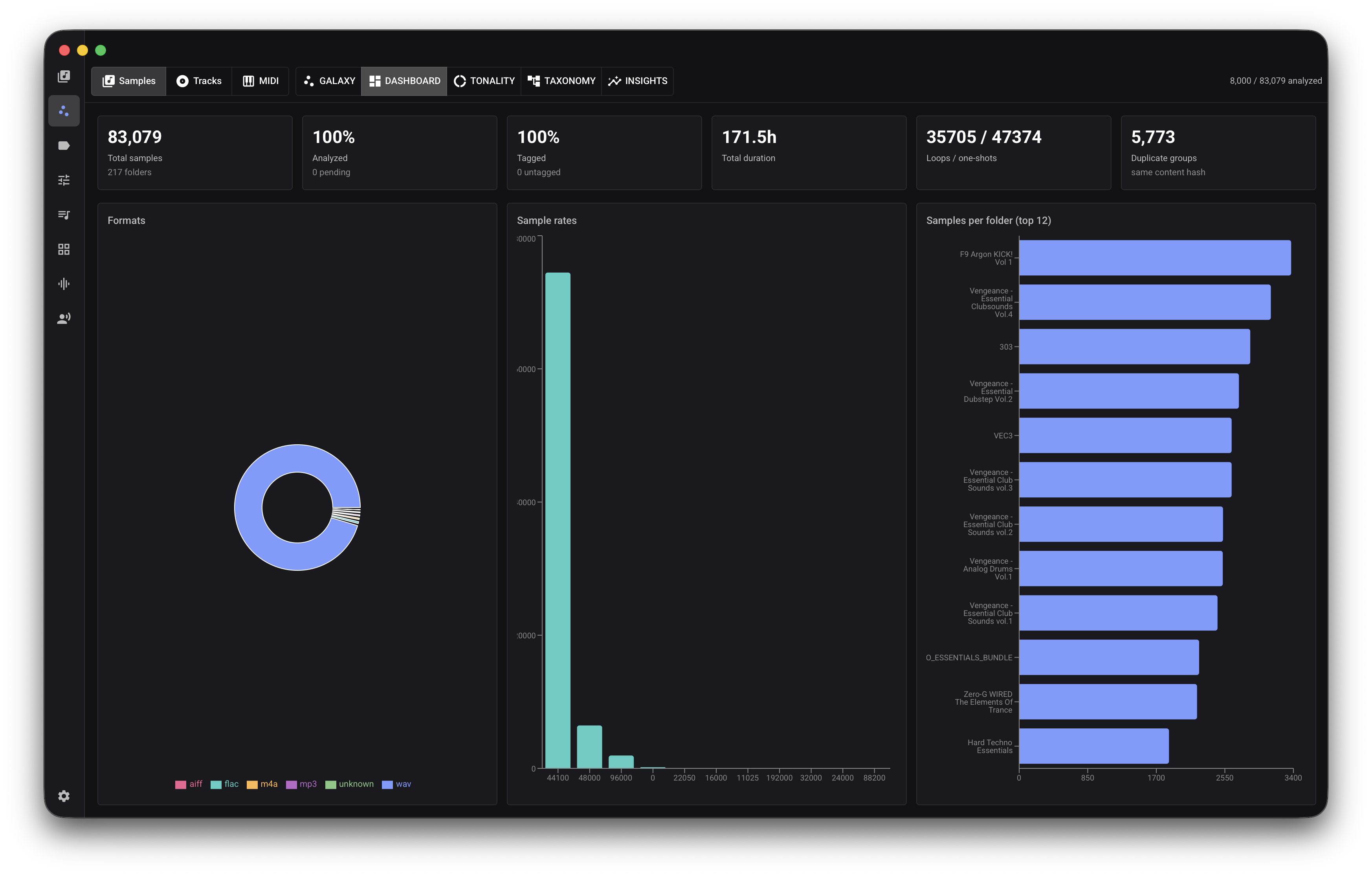
Product screenshots